
💡 Abstract
Isolating instrumental beats by removing vocals from a song is essential for karaoke, custom remix and audio production. This article defines the most effective methods for vocal elimination, ranging from accessible AI vocal remover to advanced editing techniques, providing a clear roadmap to achieve clean, instrumental-only tracks.
Table of Contents
What Is Vocal Removal?
Vocal removal is the process of isolating the human voice from an audio recording. This isolates the instrumental elements like drums and melody, leaving a clean backing track. The result is perfect for karaoke, cover songs or creative music sampling.
Traditionally, this relied on techniques like phase cancellation, which often reduced overall audio quality. However, powerful AI algorithms analyze audio frequencies to cleanly separate vocals from music. This allows anyone to achieve impressive results without needing advanced audio editing skills.
How to Remove Vocals From a Song?
Removing vocals is a breeze when you use a powerful tool like AI vocal remover in Tad AI. Here is how you can use it to isolate vocals from songs in just a few clicks.
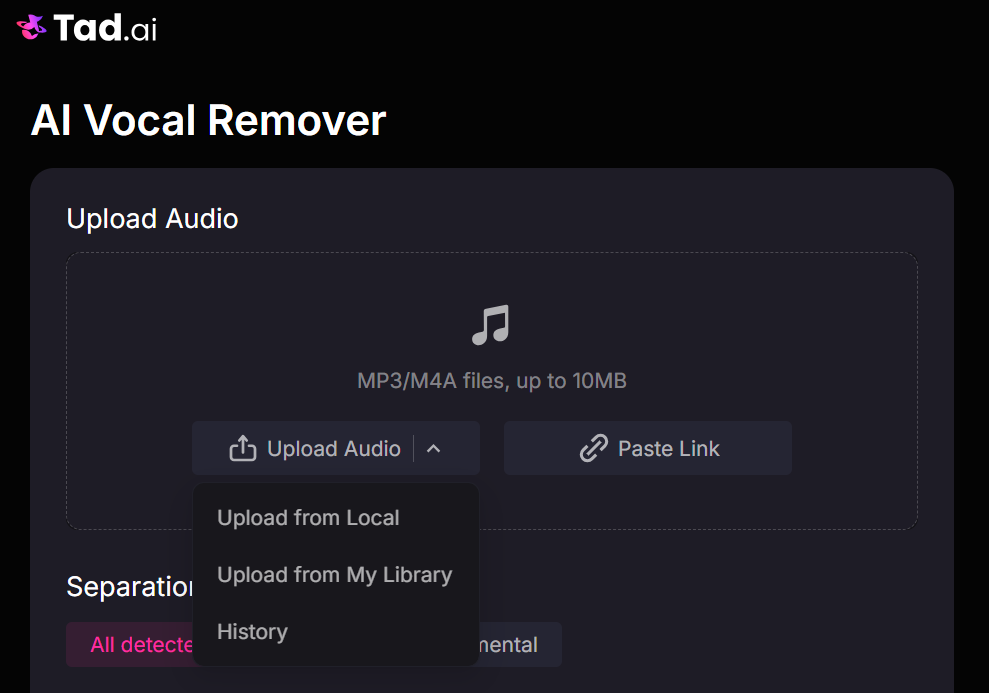
Upload Your Audio File
Start by uploading the song you want to process to Tad AI. You can easily upload a local audio file directly from your computer or device. Alternatively, simply paste an effective link for the platform to automatically analyze and extract the audio.
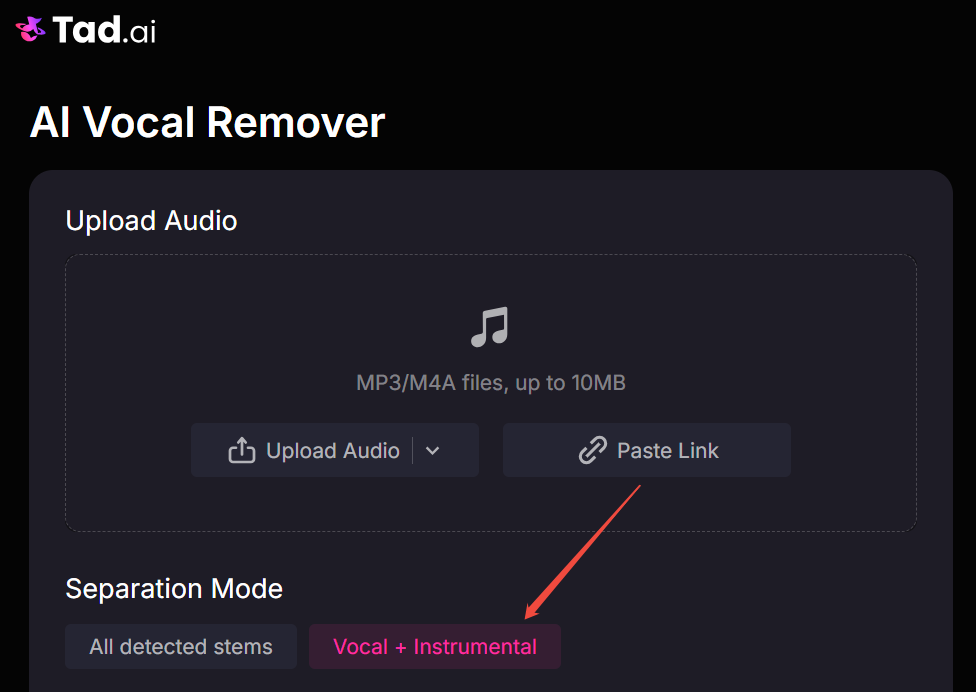
Choose Your Separation Mode
Once your audio is loaded, navigate to the next setting. Here, you need to select the specific Vocal and Instrumental separation mode. This tells the AI exactly which elements of the audio it needs to target and isolate.
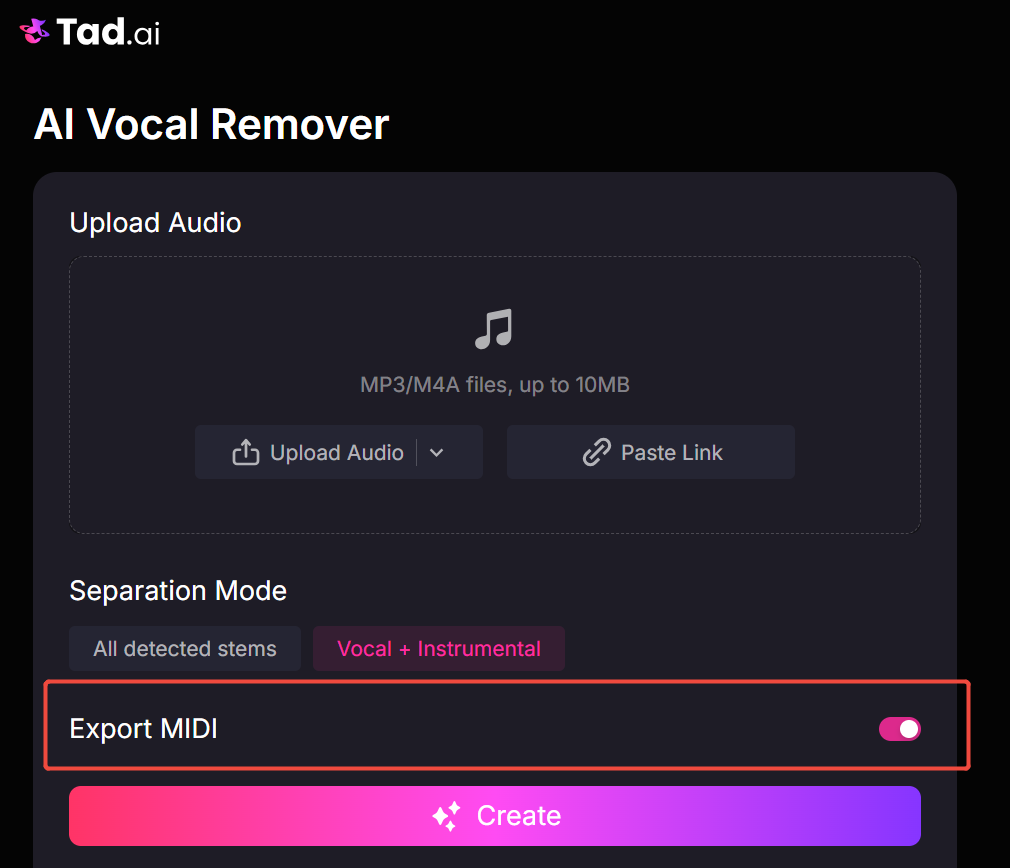
Enable the MIDI Export Option
Tad AI offers a bonus feature for musicians and producers looking for extra control. Before initiating the process, you can choose to turn on the Export MIDI file button. This enables you to download professional MIDI files alongside your separated stem files.
Click Create and Download
Finally, click the Create button and let the tool seamlessly process and isolate the audio. It will deliver the separated vocal and instrumental tracks respectively on your screen. You can then easily preview the finished results and download the individual files.
Separation Modes Explanation
Understanding the available processing options is key to getting the best results. Tad AI offers two different modes tailored to your specific needs. Here is a quick breakdown of how each separation setting functions.
Vocal and Instrumental
This mode is ideal for creating quick karaoke tracks or clean acapellas. It strictly splits your audio into two distinct files: the human voice and the background music. This ensures a straightforward extraction perfect for basic mixing and sing-alongs.
All Detected Stems
This option is a powerful extraction engine designed for the stem splitter. It is capable of detecting and separating all individual stems of your uploaded audio. You will receive isolated tracks for the bass, drums, guitar, synth, and much more.
Tips for Removing Vocals From Songs
Achieving the perfect vocal isolation requires more than just picking the right tool. Following a few best practices can dramatically improve the final quality of your audio.
- Use High-Quality Source Audio: Start with lossless formats or high-bitrate MP3s. Compressed files contain hidden audio artifacts that can confuse the AI and ruin your separation.
- Avoid Excessively Layered Tracks: Songs with heavy reverb, echo, or dense backing harmonies are harder to split. Simpler tracks with clear vocal mixing always yield the best results.
- Polish with Post-Processing: If a tiny bit of vocal bleed remains, don’t worry. You can find a free audio editor to apply quick equalization and mute any leftover frequencies.
Conclusion
Removing vocals from your favorite tracks has never been more accessible. With advanced tools like Tad AI, anyone can quickly isolate vocals or instrumentals for any creative project.
Whether you are building a karaoke library or remixing a hit song, the possibilities are endless. Grab your audio files, choose your separation mode and start experimenting with your music today.
🔒 Top Security · 💳 Free Plan Available · ⭐ 4.8/5 Rating